A Healthcheck Framework
(LLMs were used to help organize and translate this post)
Why: the failure I can't see
(Related posts: My Personal Information System , Personal Information System Implementation )
A backup that silently stopped working is worse than no backup, because I only find out when I need it.
My goal at home is simple to state: preserve my information. That means identification and health documents, contracts and invoices, professional work, about 750 GB of photographs and 182 GB of lossless music. The authoritative copy lives on my laptop (lapm). A small Raspberry Pi (rasp1) is only a passing spot: it runs the VPN endpoint and the services that bring my phone's photos and contacts home. Both run Alpine Linux.
Around that data sit several things that protect it: encrypted backups to the cloud, a firewall with no open ports, a VPN, a local DNS resolver, a correct clock, and regular updates. Each one only protects me while it works, and each one fails quietly. A cron job stops, a repository becomes unreachable, a firewall ruleset is flushed, a clock drifts, DNS falls back to the router, a filesystem counter starts ticking.
I wanted one question answered at a glance, on every machine: is everything that protects my data working right now?
My principles, restated
Every choice below follows from the same short list of principles I use for all my IT. Monitoring is where they are easiest to break, because the tempting answer is a hosted dashboard.
- Security. Protect the information from unwanted access. The monitoring tool runs as root and sees everything, so it must be small, local and have no way in from outside.
- Privacy. Personal data stays personal. No agent phoning home, no third-party service that learns when my laptop is up.
- Minimalism and simplicity. Software I can read in one sitting and understand completely. If I can't explain it on a napkin, I won't trust it at 3 a.m.
- Efficiency. A check that costs more than the problem it detects is a bad check.
- Sovereignty. If a provider shuts down, there is a plan B. For monitoring the plan B is that there is no provider.
- Portability. I should be able to change distribution, hardware or tools without a big effort. Plain POSIX shell and busybox tools travel everywhere.
- Longevity. The data must be readable years from now, and so must the tool that guards it. A text file and a shell script age well.
- The Unix and suckless philosophies. Small programs that do one thing, text as the interface, composition over frameworks.
The practical result: no daemon, no database, no web server, nothing beyond tools I already run for other reasons (curl and jq are only needed for the Syncthing check). Just scripts, a config file, and one text file with the results.
What I wanted
The system has to answer "is everything fine?" without me looking, and it must never say yes when it doesn't know.
- Cover the basics: updates and upgrades, running services, firewall, backups, clock, DNS, disk and filesystem health, and on the Pi the VPN and Syncthing.
- Run unattended from root, every two minutes, from cron. Administration stays separate from my daily user, which can only read the result.
- One visible signal. My sway status bar shows one indicator per machine, and anything other than OK has to be noticeable without opening a terminal.
- Detail on demand. One click shows every check and its message.
- One code base for several machines. The laptop and the Pi run the same framework, but not every check applies to both. The Syncthing and WireGuard checks make no sense on the laptop.
- Failure must be visible. A dead cron, a hung run, a missing config, an unreachable Pi, or a check that cannot decide must never look like green.
- Secrets stay root-only and outside the shared code, so I can share the scripts without scrubbing them.
- Check the outcome, not the daemon. "ntpd is running" says little; "the clock agrees with a time server" says what I care about. Likewise for backups: a recent snapshot in the repository, not a cron job's exit code.
The implementation
A shell script, started by cron every two minutes, reads one config file, runs the checks assigned to the machine it is on, and writes the results to one text file that the status bar reads.
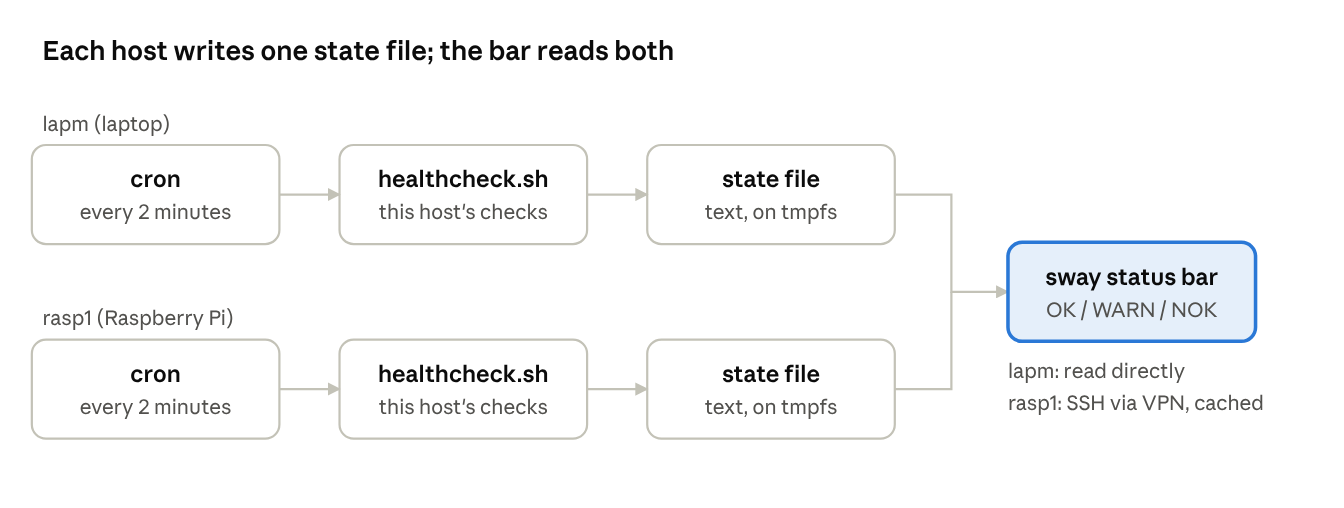
On each host cron starts the runner, which writes a state file. The bar reads the laptop's file directly and the Pi's over SSH.
The runner
healthcheck.sh does the scheduling so the checks don't have to. It works out its own real directory (following symlinks, because cron reaches it through /etc/periodic/2min), takes a lock, and loops over the config. A check is due when it has never run, when its interval has elapsed, or when it is failing and five minutes have passed since the last try. Due checks run with a hard timeout and with stdin closed, so a hung check cannot stall the others or swallow the config file. A check that crashes, times out or exits with an odd code is recorded as UNKNOWN, never as OK.
Healthy checks run at their own pace: most every 15 minutes, restic every 6 hours, the btrfs scrub review once a day. Failing checks are retried quickly, so recovery shows up within a few minutes.
One config for every machine
The config has a column that says where each check runs. The same file is installed on both machines:
# name              hosts   every  script
disk_usage          *       15m    disk_usage.sh
btrfs_errors        lapm    15m    btrfs_errors.sh
dns_check           lapm    15m    dns_check.sh
syncthing_check     rasp1   15m    syncthing_check.sh
wireguard_check     rasp1   15m    wireguard_check.sh
* means every host; a comma list names several. Adding a machine is one more name in that column.
Per-host settings and secrets
What differs between machines lives in a root-only local.env, never in the shared files: the host name, backup tags, and the one real secret, a Syncthing API key. Variable names follow HC_<SERVICE>_<SETTING>:
HC_HOST=rasp1
HC_RESTIC_TAGS="rasp1-config"
HC_SYNCTHING_API_KEY=...        # never leaves this file
HC_WIREGUARD_WATCH_PEERS=""
The runner warns if the file is readable by anyone but root. Because the scripts hold no secrets, I can show them (and this post) without scrubbing anything.
The checks
Each check is a short script that prints one line and exits with a code: 0 OK, 1 WARN, 2 UNKNOWN, 3 CRIT. The overall result is the worst code. Unless noted, a check runs on both machines.
disk_usage: Fill level of the root filesystemrunning_kernel: The running kernel is the newest installed oneapk_check: Package index is fresh and no upgrades are waitingrestic_check: Every backup tag has a recent snapshot in the cloud repositorynft_check: The live firewall ruleset equals the one in its config fileservices_check: No crashed services; everything that should be started isntp_check: A daemon runs and the clock agrees with a time serverdns_check: Laptop only: local resolver runs, resolv.conf names only local resolvers, a lookup worksbtrfs_errors: Laptop only: all btrfs device error counters are zerobtrfs_scrub_check: Laptop only: the last scrub finished, was clean and is recentsyncthing_check: Pi only: API reachable, phone seen recently, photo folder fully syncedwireguard_check: Pi only: interface up, right port, expected peers loaded
Two of them show the "outcome, not daemon" idea. The firewall check loads the config file into a throw-away network namespace and compares that ruleset with the live one, so there is no baseline to keep in sync. The clock check sends one SNTP packet and compares the answer with the local clock, which works the same for any NTP daemon.
The state file
Results go to a text file on tmpfs, written to a temporary file and then moved into place, so readers never see a half-written file:
nft_check.last_run=1792851050
nft_check.output=OK nftables: loaded, 2 tables, matches /etc/nftables.nft
nft_check.result_code=0
global.result_code=0
global.last_run=1792851052
global.failing=
global.last_run is refreshed on every run. Its age is the proof that the runner itself is alive.
The status bar

The sway bar reads the laptop's state file directly and shows OK in green, WARN in amber, or NOK in red, followed by the names of the failing checks. For the Pi, a background loop fetches its state file over SSH through the VPN once a minute into a cache, with short timeouts, so an unreachable Pi can never freeze the bar. A state that is missing, malformed, or older than six minutes shows as NOK. Clicking a host opens a terminal with every check and its message, non-zero results highlighted.
Security
The healthcheck opens no ports, sends nothing off the machines, and has no inbound access. The runner is root-only, the secrets file is root-only, and the status bar needs nothing more than read access to a world-readable text file and a read-only SSH key to the Pi. That key can be restricted so it can run only the one command that prints the state file.
What I learned
The first version was vibe-coded with an AI assistant: fast to write, and it ran on my machines without complaint. Then I had the code reviewed line by line, and the review found problems that a green status bar could never have shown me.
- A check that says OK when it can't tell is worse than no check. Two scripts reported success when the tool they depended on was missing or failing.
- A monitor must be able to fail loudly. A lock directory that survived a reboot, a temporary file that was appended to instead of replaced, or a missing config would each have left an old "all OK" on screen. Now the age of the state file is part of the signal.
- Shell has quiet traps. A loop that reads its config from stdin lets any check that reads stdin eat the remaining lines, so later checks silently never run. A signal trap that doesn't call
exitlets the script carry on. Values containing=get truncated by a carelesscut. - Secrets in code are a habit, not a decision. An API key had crept into a script. Moving it to a root-only file was easy once the per-host settings file existed.
- Real hosts surprise you. Cron reached the script through a symlink, so "the directory of the script" was the wrong directory. A DNS check built for my laptop made no sense on the Pi, which has no local resolver, and the fix was a column in the config, not an exception in the script.
- Make failures say why. My stricter DNS check failed on its first run, and the message only said that resolv.conf was not exclusively local. A failing check should name the offending line, so the message now does.
What's next
The framework covers what I set out to cover, but a few gaps remain, and I'd rather list them than pretend they aren't there.
- Backup integrity. The restic check proves a recent snapshot exists, not that the repository is intact. A periodic
restic checkshould be a check of its own. - A DNS signal for the Pi. It has no local resolver, but it still needs name resolution for updates, backups and time. A lookup-only variant of the DNS check would give it one.
- Per-check retry. Failing checks are retried every five minutes at most, one setting for all. Cheap checks could go faster.
- Paths that haven't failed yet. Some failure branches (a crashed service, a scrub with errors, a drifted firewall) are written but haven't met a real failure. I'll know more when they do.
- Notification. A status bar is only seen when I'm at the laptop. If a failure persists for a day, something should tell me.
The design goal hasn't changed: one boring text file, one small signal, and no way for a failure to hide behind a green light.