A Personal Information System: Architecture and Implementation
(LLMs were used to help organize and translate this post)
In my previous post, I described the principles guiding my personal information system: security, privacy, simplicity, efficiency, sovereignty, portability and longevity.
This time, I want to get more concrete and explain how these principles translate into an actual implementation. The goal is not to build a sophisticated infrastructure, but to create a system I can understand, control, maintain and recover, without depending excessively on external services.
Three endpoints, clearly defined roles
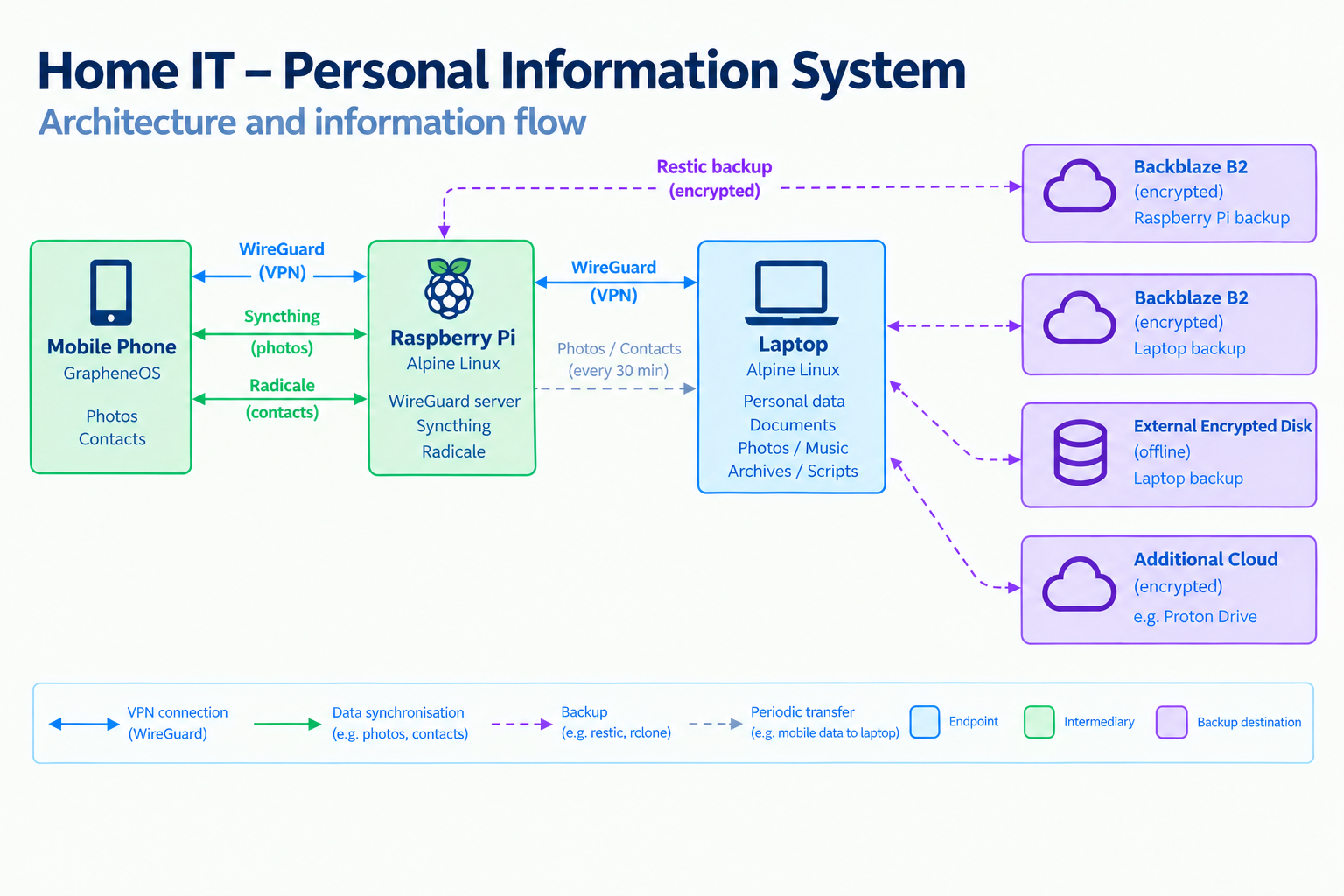
The architecture relies on three endpoints: my laptop, a Raspberry Pi at home and my mobile phone.
The laptop: the authoritative archive
My main computer is a Lenovo ThinkPad T14 Gen 4 running Alpine Linux, with Sway on Wayland.
It serves as my daily workstation and the authoritative repository for my personal information. Documents, personal records, professional files, photographs, music, archives and scripts all live on its filesystem.
I deliberately keep information in ordinary files and directories rather than building the system around a proprietary application or database. This makes the data accessible through different tools and simplifies migration to other software or hardware.
The desktop environment follows the same philosophy. LibreOffice and Firefox cover general productivity and browsing, while lightweight tools such as nnn, Zathura, imv and gThumb handle file management and media viewing.
The laptop also collects information from the other endpoints and runs the main backup procedures.
The Raspberry Pi: a service intermediary
The second endpoint is a Raspberry Pi 5, also running Alpine Linux.
Its role is deliberately limited. It provides a WireGuard VPN endpoint, a Syncthing service for receiving photographs from my mobile phone, and a Radicale server for synchronising contacts.
I treat this machine as an intermediary rather than a primary repository. Information received from the phone is eventually transferred to the laptop, which remains the authoritative archive.
This separation means that the Raspberry Pi provides useful services without becoming the sole place where important information lives.
The mobile phone: an information source
My phone runs GrapheneOS, with an emphasis on avoiding closed-source applications wherever practical.
It is primarily an information source rather than the place where my personal archive lives. Photographs are synchronised through Syncthing, while contacts are managed through Radicale.
This division of responsibilities keeps the phone useful without making it the centre of the system.
How information flows
The architecture separates information collection from the authoritative archive and from the mechanisms that protect it.
The main flow is straightforward:
- The phone connects to the Raspberry Pi through WireGuard.
- Syncthing transfers photographs to the Raspberry Pi, while Radicale provides contact synchronisation.
- The laptop connects to the Raspberry Pi through its own WireGuard connection and periodically copies the relevant mobile data into its local data directory.
- The laptop's regular backup procedures protect this information alongside the rest of the archive.
The transfer from the Raspberry Pi to the laptop runs every 30 minutes. This introduces a short delay between capturing information on the phone and having it included in the laptop's regular backups.
The Raspberry Pi therefore acts as a temporary collection point, while the laptop remains the authoritative repository. This also makes the overall architecture easier to maintain: the supporting services can change without changing where the information ultimately belongs.
Security through separation and simplicity
Security is implemented in several layers rather than delegated to a single application.
The laptop uses encrypted Btrfs filesystems and an nftables firewall, with no publicly accessible ports. Connections to the Raspberry Pi take place through WireGuard, with SSH also allowed through eth0 as a fallback in case of VPN problems.
The Raspberry Pi follows a different security model. Its filesystem is not encrypted because I want the machine to restart and resume its services without waiting for someone to unlock the disk. This is an explicit trade-off: the server does not hold the authoritative archive of my critical information, and its firewall restricts access to the VPN endpoint and SSH from the local network. Syncthing and Radicale are accessible through WireGuard rather than directly from the internet.
The home router forwards the WireGuard port to the Raspberry Pi, allowing the phone to establish a secure connection when needed.
The distinction between the two computers is intentional. The laptop prioritises the confidentiality of the main archive; the Raspberry Pi prioritises the availability of a small set of supporting services.
Backups: multiple destinations, different purposes
A backup strategy should account for more than hardware failure. Accidental deletion, corruption, compromised systems and loss of access to a service can all put information at risk.
My current approach combines several mechanisms.
Daily encrypted cloud backups
The laptop uses Restic to back up its data and configuration daily to an encrypted repository in Backblaze B2. The Raspberry Pi has its own Restic repository in a separate B2 bucket.
Keeping the repositories separate avoids making both machines dependent on a single backup repository.
An offline local copy
Periodically, I synchronise the laptop's filesystem to an encrypted external hard drive using rsync. The drive is connected only for the duration of the synchronisation.
This provides a local recovery option that is not continuously attached to the system, reducing exposure to incidents that might affect connected storage.
An additional cloud copy
I still maintain an encrypted rclone synchronisation to another B2 bucket. This is somewhat legacy at the moment, and I may remove it if it no longer provides enough additional value.
I also synchronise selected information to Proton Drive manually. These operations are synchronisations, not substitutes for versioned backups.
That distinction matters: synchronisation keeps copies aligned and can propagate unwanted changes or deletions. Backups serve a different purpose by providing a means to recover protected copies of information.
Automation and monitoring
Routine administration on the laptop is performed by root through scheduled jobs. These include system updates, Restic backups and health checks.
A small health-check script periodically checks aspects such as updates, services and firewall status. It writes the results to a state file that the Sway status bar can display.
The laptop also retrieves health information from the Raspberry Pi, giving me a consolidated view of both endpoints without having to inspect each machine manually.
This is a deliberately lightweight approach to monitoring. I prefer a small script whose behaviour I can inspect over introducing a separate monitoring platform that would require additional infrastructure and maintenance.
I also try to keep everyday data handling separate from privileged administrative and backup operations, reducing unnecessary coupling between normal use and the mechanisms responsible for protecting the archive.
What remains to be done
The architecture is functional, but it is not finished.
Two improvements remain particularly important.
The first is to prepare encrypted recovery USB drives containing the information, configuration files, keys and recovery procedures needed to rebuild the system. I intend to keep one at home and another in a physically separate location.
The second is to introduce another independent backup destination, probably with a European provider such as OVHcloud, reducing dependence on a single cloud provider.
Recovery deserves particular attention. Encrypted backups are not enough if the keys are lost, the configuration is unavailable or the restoration procedure is unclear. Recovery instructions and the necessary configuration information are therefore part of the archive itself, and will also be included in the recovery media.
Final thoughts
The architecture is not built around any single application or service. It is built around the information itself.
Alpine Linux provides a relatively small operating system foundation. Standard files and directories preserve access to the data. WireGuard, Syncthing and Radicale provide specific communication and synchronisation capabilities. Restic, rsync and encrypted storage address different recovery needs.
Each component has a limited, understandable role. The overall system remains useful without requiring a single vendor to control the entire workflow.
For me, this is the practical meaning of sovereignty and longevity in a personal information system: knowing where the information lives, how it moves, how it is protected and, crucially, how to recover it when something goes wrong.
The architecture will continue to evolve, but the guiding principle will remain the same: the system should serve the information, not the other way around.